

The ERD Exerciser is a Java application designed to help students practice their ability to create entity-relation diagrams (ERDs). It contains a variety of questions which present scenarios for the user to draw an ERD for. After the ERD is drawn, the user can ask the tool to grade their diagram. The tool will compare the user's diagram to a known solution and assign a mark. The user will then receive feedback in diagrammatic form on their work. This feedback can be used to improve the user's ERD.
The Exerciser Revision Tool is a stand-alone java application that helps students practice their skills at drawing entity-relation diagrams (ERDs) to model data. The tool contains a number of questions each containing a scenario from which the user is asked to draw an equivalent ERD.
Having drawn the ERD, the student can ask the tool to mark (grade) their diagram. The tool will compare the user's diagram with a known solution (called the specimen solution) and return a mark. The tool will then offer the user several forms of feedback, in diagrammatic form, on their work.
Based on the feedback the user can amend their diagram and resubmit it for marking and obtain further feedback.
If the draw-mark-feedback-re-draw cycle is insufficient for the student to reach a correct diagram, the user can ask the tool to reveal the specimen solution and then interrogate the solution for further information. The user can click on an element of the specimen solution diagram and the tool will identify (highlight) those parts of the data (in the question) that give rise to the selected part of the diagram. Right-clicking on part of the diagram will cause a pop-up box to appear with an explanation of why that element of the diagram has been included in the specimen solution.
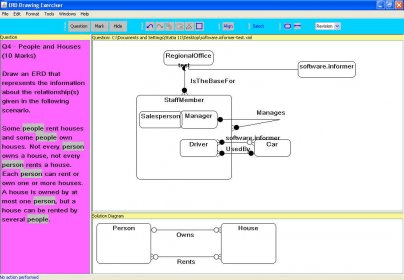
The Exerciser has three panes labelled Question, Drawing and Specimen Solution. A new question can be obtained by pressing the Get Question button. The Drawing pane is where the user draws ERDs using an inbuilt drawing tool. The specimen solution appears in the Specimen Solution pane on clicking the Specimen Solution Button.




Comments